This article contains the technical specifications of Paazl's SOAP API commitOrder call.
Use commitOrder to finalize pending orders that have been confirmed by customers.
Why commit orders?
When processing orders, Paazl uses two different order types to model the purchase transaction: a "pending order" and an "order". The pending order serves as a temporary reference point for available shipping options. When your customer selects an option and clicks "Buy", the pending order becomes an order and you have to commit it.

The following is a more detailed description of how this works:
- A customer places an item in your webshop's shopping basket
- Step 1 triggers an orderRequest call to Paazl with your reference code in the call's
orderReferenceelement - Paazl creates a pending order in its database using your reference code. The order is not yet visible on your account.
- Your customer fills in his/her address details
- Step 4 triggers a shippingOptionRequest call to Paazl, following which the returned options are displayed in your checkout
- Your customer selects a shipping option, fills in his/her payment details, and clicks the "Buy" button
- Step 5 triggers a commitOrderRequest call to Paazl. This call contains a reference to the pending order (
pendingOrderReference) and a (new) reference for the order (orderReference) - Paazl creates the order in its database using the <orderReference> value, and displays the order in your webshop account
Example
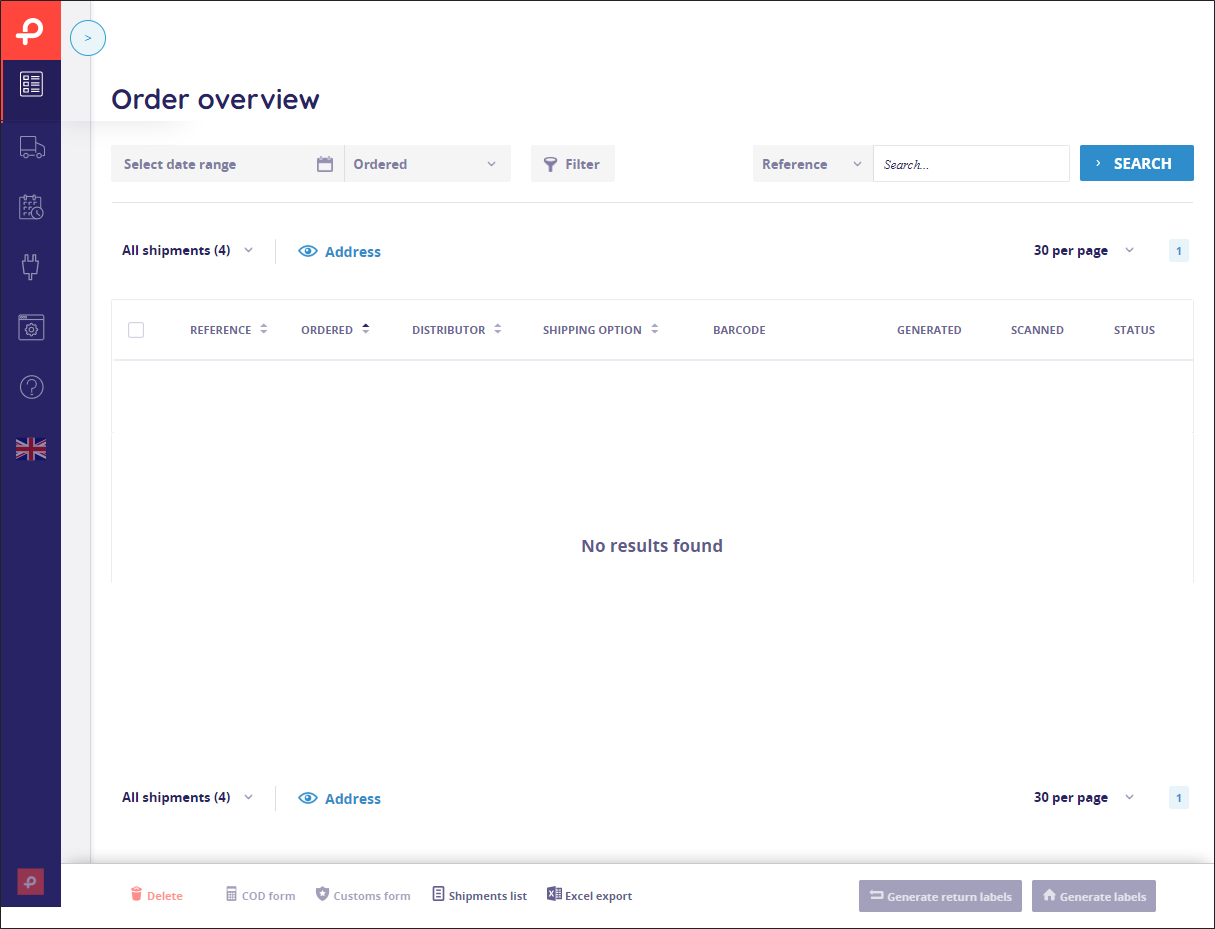
Assume a customer is in your checkout and has filled in his/her address details. Using the orderRequest call's orderReference element, you tell Paazl that the reference code for the pending order is temp0001. That value is stored in Paazl's database but it is not visible in your webshop's Paazl account.
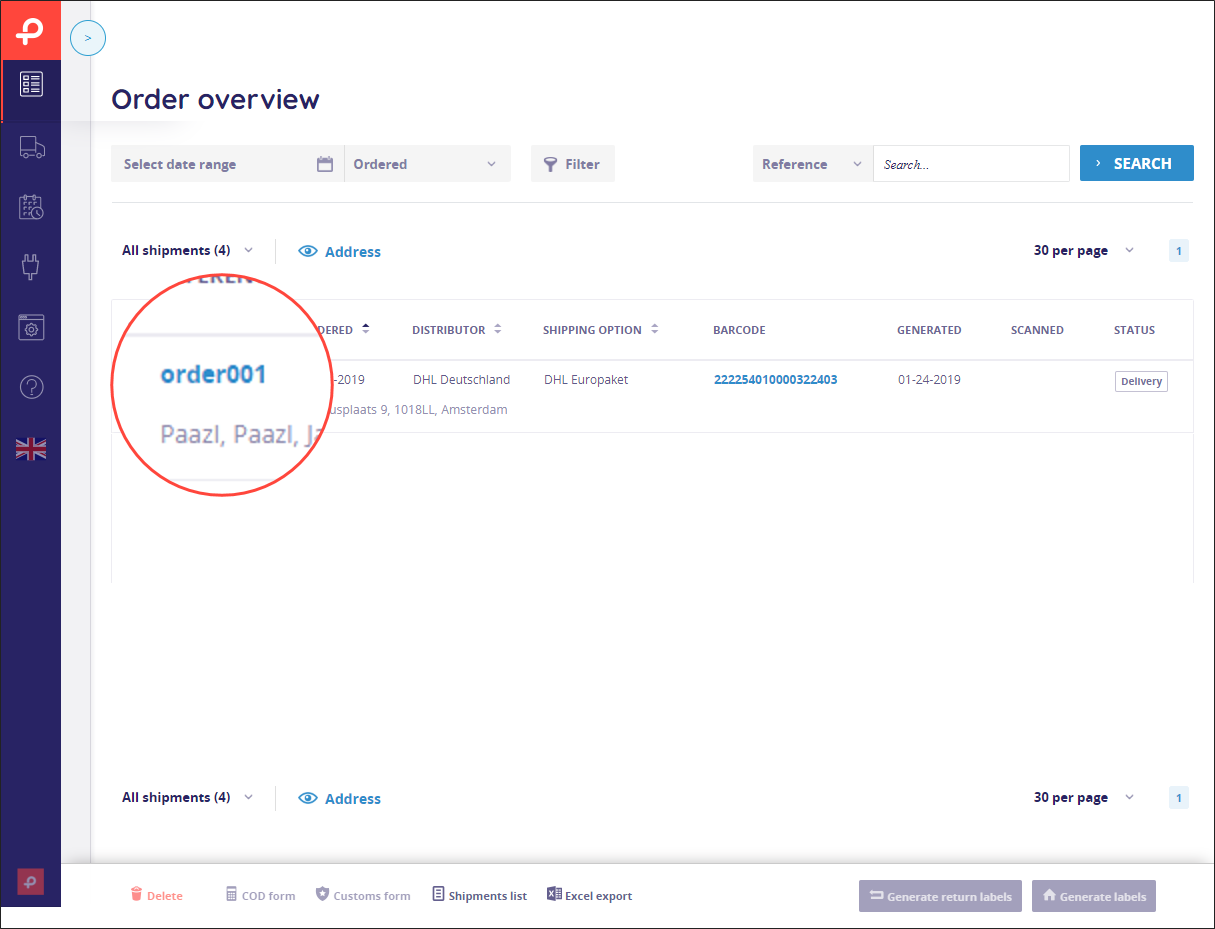
Your customer now clicks "Buy" and you send a commitOrder request to Paazl. You tell Paazl that the pending order concerned is temp0001 using the pendingOrderReference element. At the same time, using the orderReference element, you tell Paazl that the reference code you want to use for the committed order is order0001. Paazl creates the order with reference code order0001 and it appears in your Paazl account.
Shipping Address Formats
Carriers can have different requirements regarding how they want to format shipping addresses for each of the shipping options they offer. These requirements may affect the maximum length of fields, and the granularity of the address elements. Normally you supply Paazl with address information in a standard format and Paazl translates this into the format required by the carrier concerned. However, when you work internationally, local customs can change the way you work. For example, American webshop customers find it annoying to have to fill in address details in separate fields; Ireland does not use postal codes; and in France the address may be more a description of what the house looks like than a formal address. Such issues may require you to supply Paazl with information in a non-standard format.
The standard elements provided by Paazl for specifying addresses are:
streethousenumberaddition(used for house number extension)zipcodecityprovincecountryadditionalAddressLine(used for the second line on a label)
In most cases it is a straightforward process to fill these fields. However, when shipping to different countries, things become more complicated. A small number of carriers require you to fill in all the data as a single string. Others require you to fill in the data using two strings, although they differ regarding which information goes where.
For single strings, Paazl uses the street element. When two strings are required, Paazl uses the street element for the first line of the label, and the additionalAddressLine for the second line. In addition, there may be restrictions on the number of characters you can use for any one element. Paazl's maximum field lengths are usually more restrictive than those of the various carriers — so just conforming with Paazl specifications is sufficient — but there are exceptions to this rule too.
Hopefully you won't bump into these issues during your implementation. If you do, the specific requirements of the carrier and shipping option concerned will have to be determined during the integration of your webshop with Paazl.
Request
Element specifications
| Element | Type | Required? | Description |
|---|---|---|---|
hash | String(255) | Yes | An SHA-1 encrypted authentication code. The string you encrypt is a concatenation of the following substrings: <webshop ID> + <integration password> + <order reference> Note: The order reference in this case is that of the pending order. See Why commit orders? above for an explanation of the distinction between "orders" and "pending orders". Example Webshop ID: "123" Integration password: "myPassword" Order reference: "Order001" String to encrypt: "store12myPasswordOrder001" |
webshop | Long(10) | Yes | The Webshop ID of your main webshop. You will find this in the Paazl UI under Settings > My Account |
targetWebshop | Long(10) | No | If you use multiple webshops, this is the webshop ID of a child webshop (a.k.a. Paazl sub-account). You will find it in the Paazl web app account of the child webshop concerned under Settings > My Account. The hash you create using the webshop ID of your parent webshop (a.k.a. main account) will give you access to its child webshops as well. |
orderReference | String(255) | Yes | Your webshop's reference code for the order concerned. If you leave this element empty, Paazl will use the value in |
pendingOrderReference | String(255) | Yes | Your webshop's temporary reference code for the order concerned. The code that you use to refer to an order until your customer has clicked the "Buy" button (see Why commit orders? above). |
totalAmount | Integer | Yes | The total monetary value of a webshop order in the smallest unit of the currency concerned (e.g. cents). For Cash on Delivery (COD) shipments, this amount is printed on the label. |
totalAmountCurrency | String(3) | No | The ISO 4217 code of the currency concerned. The default value is |
language | String(2) | Conditional | The ISO 639-1 code of the language concerned. This value is used to determine the e-mail language and will override the country code contained in the Possible values are Note: Only give this element a value if you have enabled email notifications in your Paazl web app account. |
customerEmail | String(255) | Yes | The email address to which Paazl should send email notifications. |
customerPhoneNumber | String(15) | Conditional |
|
shippingMethod | Complex element | Yes | Contains shipping method details. |
type | Enum | Yes | The enum value can be |
distributor | String(255) | No | The shipment's carrier. A list of Paazl carrier codes is available on Paazl's online help. |
contract | String(255) | No | The code of the carrier contract concerned, as configured in your Paazl account. |
identifier | String(255) | Conditional | This is required if the value of <type> is |
option | String(255) | Yes | This is the shipping option type. Use the <type> value in the <shippingOption> element of the shippingOption Response. |
returnContract | Complex element | No | This element contains the type and code of your returns contract as configured in your Paazl account. |
type | Enum | Yes | This can take one of 3 values:
|
contract | String(255) | Yes | The code of the returns contract with the carrier concerned, as registered in Paazl |
servicepointAccountNumber | String(255) | Conditional | The Pack Station account number of the customer picking up the package concerned. Required if the carrier is "DHL DE Packstations" and highly recommended for "DHL DE Parcelshops" |
servicepointNotificationEmail | String(255) | Conditional | The email address is used by the carrier's notification service. Required if the value of <type> is servicepoint and <servicepointNotificationMobile> is empty. If you fill both <servicepointNotificationMobile> and <servicepointNotificationEmail>, the value in <servicepointNotificationMobile> will have priority. |
servicepointNotificationMobile | String(255) | Conditional | The mobile phone number is used by the carrier's SMS notification service. Note: Remove all spaces and other non-numeric characters from the value you assign. Required if <type> = servicepoint and <servicepointNotificationEmail> is empty. If you fill both <servicepointNotificationMobile> and <servicepointNotificationEmail>, the value in <servicepointNotificationMobile> will have priority. |
price | Double(10,2) | No | The price of the selected shipping option. Note: Paazl does not use this value in any of its calculations. |
shippingPaymentType | Enum | No | An enumeration specifying who is paying for the shipment. It can have one of three values:
|
billingAccountNumber | String(255) | Conditional | The account number of the customer concerned. Required if the value of <shippingPaymentType> is consignee or thirdparty. If the value is shipper, you can leave this element empty because Paazl will get the number from your Paazl account. |
invoiceNumber | String(255) | No | The customs invoice number. |
invoiceDate | Date | No | The invoice date of the customs invoice. |
packagingWeight | Non-negative Decimal(10,2) | No | (Deprecated) This is the weight of the packaging itself. PostNL used to make a distinction between gross and net package weight, but now the gross weight is always used. |
customsValue | Non-negative Decimal(10,2) | Conditional | The monetary value of the shipment. Required if the carrier is DHL, Fedex or PostNL Global Pack. |
customsValueCurrency | String(3) | No | The ISO 4217 code of the currency concerned. The default value is |
dutiesPaymentType | Enum | No | An enumeration specifying who is paying the customs duties. It can have one of two values:
|
dutiesAccountNumber | String(255) | Optional | The account number of your webshop customer. If the value of <dutiesPaymentType> is
|
orderWeight | Non-negative Decimal | Conditional | The total weight of the order (in kilograms). Required if the carrier is DHL Express or UPS shipments. It is also required if you haven't entered the individual product weights in <orderRequest> |
assuredAmount | Integer | No | This is the amount of extra insurance required, for example, for the AVG_HIGH_LIABILITY shipping option. For PostNL options specifically: The value has to be a multiple of 500, with a maximum value of 5000. |
assuredAmountCurrency | String(3) | No | The ISO 4217 code of the currency concerned. The default value is |
collo | Integer | No | This element is used for all carriers except Yunda and Australia Post. It can take one of two values:
|
packageCount | positive integer | Conditional | The number of desired packages (labels). Required if the value of <collo> is |
maxLabels | Integer | No | This sets a limit to the number of labels that can be generated for a collo (multi-package shipment). If used, it is usually set to |
packagingType | Enum | Conditional | This describes the packaging type. Required if the carrier is UPS or FEDEX. The enumeration can take one of the following values:
|
preferredDeliveryDate | Date | No | The date your customers selected at the checkout. |
preferredDateChosen | Boolean | No | This indicates whether or not a preferred date was selected at the checkout. |
description | String(255) | Conditional | This contains the description needed for Customs purposes. Required if the carrier is UPS. |
shipperAddress | Complex element | No | Contains address details of the party that ships an order. |
addresseeLine | String(30) | Yes | The name of the party that ships an order. |
street | String(255) | Yes | The name of the street of the shipper's address. |
housenumber | Integer(10) | Yes | The house number of the shipper's address. |
addition | String(10) | No | The house number extension of the shipper's address. |
zipcode | String(6) | Yes | The postal code of the shipper's address. |
city | String(64) | Yes | The city of the shipper's address. |
province | String(2) | Conditional | A two-digit code for the province of the shipper's address. Note: This is mandatory for FedEx US, Mexico and Canada shipments (if EEI applies). |
country | String(10) | No | The ISO 3166-2 code for the country of the shipper's address. If Paazl does not recognize the country code, it will return a 1008 error. The default value is |
returnAddress | Complex element | No | Contains address details of the address to which goods are being returned. |
addresseeLine | String(30) | Yes | The name of the party to which goods are being returned. |
street | String(255) | Yes | The name of the street of the address to which goods are being returned. |
housenumber | int(10) | Yes | The house number of the address to which goods are being returned. |
addition | String(10) | No | The house number extension of the address to which goods are being returned. |
zipcode | String(6) | Yes | The postal code of the address to which goods are being returned. |
city | String(64) | Yes | The city of the address to which goods are being returned. |
province | String(2) | Conditional | A two-digit code for the province of the address to which goods are being returned. Note: This is mandatory for FedEx US, Mexico and Canada shipments (if EEI applies). |
country | String(10) | No | The ISO 3166-2 code for the country of the address to which goods are being returned. If Paazl does not recognize the country code, it will return a 1008 error. The default value is |
shippingAddress | Complex element | Yes | Contains address details of the address to which an order is being shipped. |
accountNumber | String(255) | No | Optional account number for internal use. |
customerName | String(255) | Yes | The name of the customer to which an order is shipped. |
companyName | String(255) | No | The name of the company to which an order is shipped. |
vatNumber | String(20) | No | The VAT number of the receiver. |
nameOther | String(255) | No | Use this for any additional name information. |
street | String(255) | Yes | The name of the street of the address to which an order is being shipped. |
housenumber | int(10) | Yes | The house number of the address to which an order is being shipped. |
addition | String(10) | No | The house number extension of the address to which an order is being shipped. |
additionalAddressLine | String(255) | Conditional | This is required by some carriers to contain text for the second line of a shipping label. |
zipcode | String(6) | Yes | The postal code of the address to which an order is being shipped. |
city | String(64) | Yes | The city of the address to which an order is being shipped. |
province | String(2) | Conditional | A two-digit code for the province of the address to which an order is being shipped. Note: This is mandatory for FedEx US, Mexico and Canada shipments (if EEI applies). |
country | String(10) | No | The ISO 3166-2 code for the country of the address to which an order is being shipped. If Paazl does not recognize the country code, it will return a 1008 error. The default value is |
localAddressValidation | Boolean | No | If set to true, Paazl will validate the postal code and house number combination. This element is only used for Dutch addresses. Note: If the Paazl platform cannot validate an address (against its own database or a carrier's database), you will not be able to generate the shipping label or pre-register the shipment concerned. |
additionalInstruction | String(255) | Conditional | If required by the carrier, this instruction will be printed on the address label. |
Sample request
<soapenv:Envelope xmlns:soapenv="http://schemas.xmlsoap.org/soap/envelope/"
 xmlns:mat="http://www.paazl.com/schemas/matrix">
   <soapenv:Header/>
   <soapenv:Body>
      <mat:commitOrderRequest>
         <!--You may enter the following 14 items in any order-->
         <mat:hash>3ae71f4e69e43a32e2c474d4b4ac0c63632de560</mat:hash>
         <mat:webshop>491</mat:webshop>
         <!--Optional:-->
         <mat:targetWebshop></mat:targetWebshop>
         <mat:orderReference>order0001</mat:orderReference>
         <mat:pendingOrderReference>pending0001</mat:pendingOrderReference>
         <mat:totalAmount>1</mat:totalAmount>
         <!--Optional:-->
         <mat:totalAmountCurrency>EUR</mat:totalAmountCurrency>
         <!--Optional:-->
         <mat:language></mat:language>
         <mat:customerEmail>qa@paazl.com</mat:customerEmail>
         <!--Optional:-->
         <mat:customerPhoneNumber></mat:customerPhoneNumber>
         <mat:shippingMethod>
            <mat:type>delivery</mat:type>
            <!--Optional:-->
            <mat:distributor>TNT</mat:distributor>
            <mat:identifier></mat:identifier>
            <mat:option>AVG</mat:option>
            <!--Optional:-->
            <mat:returnContract>
               <mat:type>fixed</mat:type>
               <!--Optional:-->
               <mat:contract>123456789</mat:contract>
            </mat:returnContract>
            <!--Optional:-->
            <mat:servicepointAccountNumber></mat:servicepointAccountNumber>
            <!--Optional:-->
            <mat:servicepointNotificationEmail></mat:servicepointNotificationEmail>
            <!--Optional:-->
            <mat:servicepointNotificationMobile></mat:servicepointNotificationMobile>
            <!--Optional:-->
            <mat:price></mat:price>
            <!--Optional:-->
            <mat:shippingPaymentType></mat:shippingPaymentType>
            <!--Optional:-->
            <mat:billingAccountNumber></mat:billingAccountNumber>
            <!--Optional:-->
            <mat:invoiceNumber></mat:invoiceNumber>
            <!--Optional:-->
            <mat:packagingWeight></mat:packagingWeight>
            <!--Optional:-->
            <mat:customsValue></mat:customsValue>
            <!--Optional:-->
            <mat:customsValueCurrency>EUR</mat:customsValueCurrency>
            <!--Optional:-->
            <mat:dutiesPaymentType></mat:dutiesPaymentType>
            <!--Optional:-->
            <mat:dutiesAccountNumber></mat:dutiesAccountNumber>
            <!--Optional:-->
            <mat:orderWeight></mat:orderWeight>
            <!--Optional:-->
            <mat:assuredAmount></mat:assuredAmount>
            <!--Optional:-->
            <mat:assuredAmountCurrency>EUR</mat:assuredAmountCurrency>
            <!--Optional:-->
            <mat:collo></mat:collo>
            <!--Optional:-->
            <mat:packageCount></mat:packageCount>
            <!--Optional:-->
            <mat:maxLabels></mat:maxLabels>
            <!--Optional:-->
            <mat:packagingType></mat:packagingType>
            <!--Optional:-->
            <mat:preferredDeliveryDate></mat:preferredDeliveryDate>
            <!--Optional:-->
            <mat:preferredDateChosen></mat:preferredDateChosen>
            <!--Optional:-->
            <mat:description></mat:description>
         </mat:shippingMethod>

         <mat:shippingAddress>
            <!--Optional:-->
            <mat:accountNumber></mat:accountNumber>
            <mat:customerName>Paazl</mat:customerName>
            <!--Optional:-->
            <mat:companyName></mat:companyName>
            <!--Optional:-->
            <mat:nameOther></mat:nameOther>
            <mat:street>Veembroederhof</mat:street>
            <mat:housenumber>93</mat:housenumber>
            <!--Optional:-->
            <mat:addition></mat:addition>
            <!--Zero or more repetitions:-->
            <mat:additionalAddressLine></mat:additionalAddressLine>
            <mat:zipcode>1019HD</mat:zipcode>
            <mat:city>Amsterdam</mat:city>
            <!--Optional:-->
            <mat:province></mat:province>
            <!--Optional:-->
            <mat:country>NL</mat:country>
            <!--Optional:-->
            <mat:localAddressValidation>true</mat:localAddressValidation>
            <!--Optional:-->
            <mat:additionalInstruction></mat:additionalInstruction>
         </mat:shippingAddress>
      </mat:commitOrderRequest>
   </soapenv:Body>
</soapenv:Envelope>
Response
The commitOrder response consists of a simple message indicating whether or not the request has succeeded.
Sample response
<SOAP-ENV:Envelope xmlns:SOAP-ENV="http://schemas.xmlsoap.org/soap/envelope/">
   <SOAP-ENV:Header/>
   <SOAP-ENV:Body>
      <commitOrderResponse xmlns="http://www.paazl.com/schemas/matrix">
         <succes>Order successfully saved</succes>
      </commitOrderResponse>
   </SOAP-ENV:Body>
</SOAP-ENV:Envelope>
Was this article helpful?
That’s Great!
Thank you for your feedback
Sorry! We couldn't be helpful
Thank you for your feedback
Feedback sent
We appreciate your effort and will try to fix the article